Ferris on LCD Display
In this section, we will draw Ferris on a character LCD. This is my attempt at making it look like a crab. If you come up with a better design, feel free to send a pull request.
Although a single custom character is limited to one 5x8 cell, we are not restricted to just one cell. By combining 4 or even 6 adjacent grids, we can display a larger symbol. How far you take this is entirely up to your creativity.
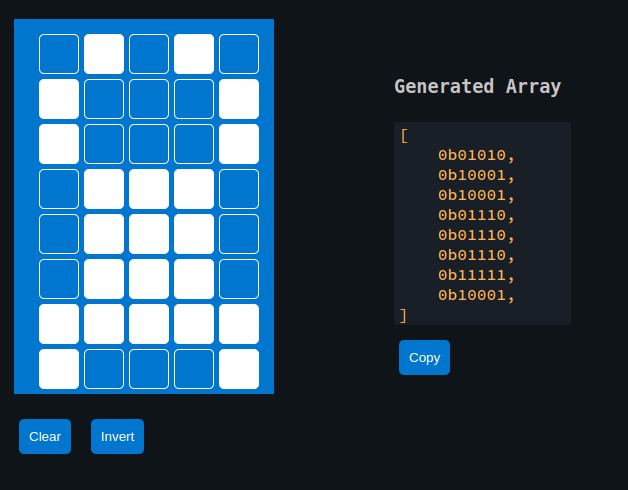
We will use the custom glyph generator from the previous page to design Ferris. The generator produces the byte array that we can directly use in our code.
liquid_crystal crate
The hd44780-driver crate that we used earlier does not support defining custom glyphs. To work with custom glyphs stored in CGRAM, we will use the liquid_crystal crate.
This crate supports custom glyphs and also provides an async API, which we will use in this chapter.
Update Cargo.toml
Enable the async feature when adding the dependency:
liquid_crystal = { version = "0.2.0", features = ["async"] }
Additional imports
Add these imports at the top of your main.rs:
#![allow(unused)]
fn main() {
// Interrupt Binding
use embassy_rp::peripherals::I2C0;
use embassy_rp::{bind_interrupts, i2c};

// I2C
use embassy_rp::i2c::{Config as I2cConfig, I2c};

// LCD Driver
use liquid_crystal::I2C;
use liquid_crystal::LiquidCrystal;
use liquid_crystal::prelude::*;
}
Bind I2C Interrupt
Bind the I2C0_IRQ interrupt to the Embassy I2C interrupt handler for I2C0:
#![allow(unused)]
fn main() {
bind_interrupts!(struct Irqs {
    I2C0_IRQ => i2c::InterruptHandler<I2C0>;
});
}
Initialize I2C
First, set up the I2C bus to communicate with the display:
#![allow(unused)]
fn main() {
let sda = p.PIN_16;
let scl = p.PIN_17;

let mut i2c_config = I2cConfig::default();
i2c_config.frequency = 100_000; // 100kHz

let i2c_bus = I2c::new_async(p.I2C0, scl, sda, Irqs, i2c_config);
}
Initialize the LCD interface
Once the I2C interface is set up, we initialize the LCD.
#![allow(unused)]
fn main() {
let mut lcd = LiquidCrystal::new(&mut i2c_interface, Bus4Bits, LCD16X2);
lcd.begin(&mut Delay);
}
Generated byte array for the custom glyph
#![allow(unused)]
fn main() {
const FERRIS: [u8; 8] = [
    0b01010, 0b10001, 0b10001, 0b01110, 0b01110, 0b01110, 0b11111, 0b10001,
];
// Define the character
lcd.custom_char(&mut timer, &FERRIS, 0);
}
Displaying
Displaying the character is straightforward. You just need to use the CustomChar enum and pass the index of the custom character. We’ve defined only one custom character, which is at position 0.
#![allow(unused)]
fn main() {
lcd.write(&mut timer, CustomChar(0));
lcd.write(&mut timer, Text(" implRust!"));
}
Clone the existing project
You can clone (or refer) project I created and navigate to the custom-glyph folder.
git clone https://github.com/ImplFerris/pico2-embassy-projects
cd pico2-embassy-projects/lcd/custom-glyph/
rp-hal version
You can clone (or refer) project I created and navigate to the custom-glyph folder.
git clone https://github.com/ImplFerris/pico2-rp-projects
cd pico2-projects/lcd/custom-glyph/
The Full code
#![no_std]
#![no_main]

use embassy_executor::Spawner;
use embassy_rp as hal;
use embassy_rp::block::ImageDef;
use embassy_time::Timer;

//Panic Handler
use panic_probe as _;
// Defmt Logging
use defmt_rtt as _;

// Interrupt Binding
use embassy_rp::peripherals::I2C0;
use embassy_rp::{bind_interrupts, i2c};

// I2C
use embassy_rp::i2c::{Config as I2cConfig, I2c};

// LCD Driver
use liquid_crystal::I2C;
use liquid_crystal::LiquidCrystal;
use liquid_crystal::prelude::*;

use embassy_time::Delay;

/// Tell the Boot ROM about our application
#[unsafe(link_section = ".start_block")]
#[used]
pub static IMAGE_DEF: ImageDef = hal::block::ImageDef::secure_exe();

bind_interrupts!(struct Irqs {
    I2C0_IRQ => i2c::InterruptHandler<I2C0>;
});

// const LCD_I2C_ADDRESS: u8 = 0x27;

#[embassy_executor::main]
async fn main(_spawner: Spawner) {
    let p = embassy_rp::init(Default::default());

    let sda = p.PIN_16;
    let scl = p.PIN_17;

    let mut i2c_config = I2cConfig::default();
    i2c_config.frequency = 100_000; //100kHz

    let i2c_bus = I2c::new_async(p.I2C0, scl, sda, Irqs, i2c_config);

    // LCD Init
    let mut i2c_interface = I2C::new(i2c_bus, 0x27);
    let mut lcd = LiquidCrystal::new(&mut i2c_interface, Bus4Bits, LCD16X2);
    lcd.begin(&mut Delay);

    const FERRIS: [u8; 8] = [
        0b01010, 0b10001, 0b10001, 0b01110, 0b01110, 0b01110, 0b11111, 0b10001,
    ];
    // Define the character
    lcd.custom_char(&mut Delay, &FERRIS, 0);

    lcd.write(&mut Delay, CustomChar(0));
    // normal text
    lcd.write(&mut Delay, Text(" implRust!"));

    loop {
        Timer::after_millis(100).await;
    }
}

// Program metadata for `picotool info`.
// This isn't needed, but it's recomended to have these minimal entries.
#[unsafe(link_section = ".bi_entries")]
#[used]
pub static PICOTOOL_ENTRIES: [embassy_rp::binary_info::EntryAddr; 4] = [
    embassy_rp::binary_info::rp_program_name!(c"custom-chars"),
    embassy_rp::binary_info::rp_program_description!(c"your program description"),
    embassy_rp::binary_info::rp_cargo_version!(),
    embassy_rp::binary_info::rp_program_build_attribute!(),
];

// End of file